
Hello, folks. I hope you’re staying warm in all of this cold weather. It’s 38 and about to snow where I am.
I recently received a question regarding formatting a manuscript for Amazon’s KDP. While I answered the question via email, I wanted to share the information here as well. The measurement I’m about to provide work for KDP, but they may or may not work for other publishers. Just a little heads up.
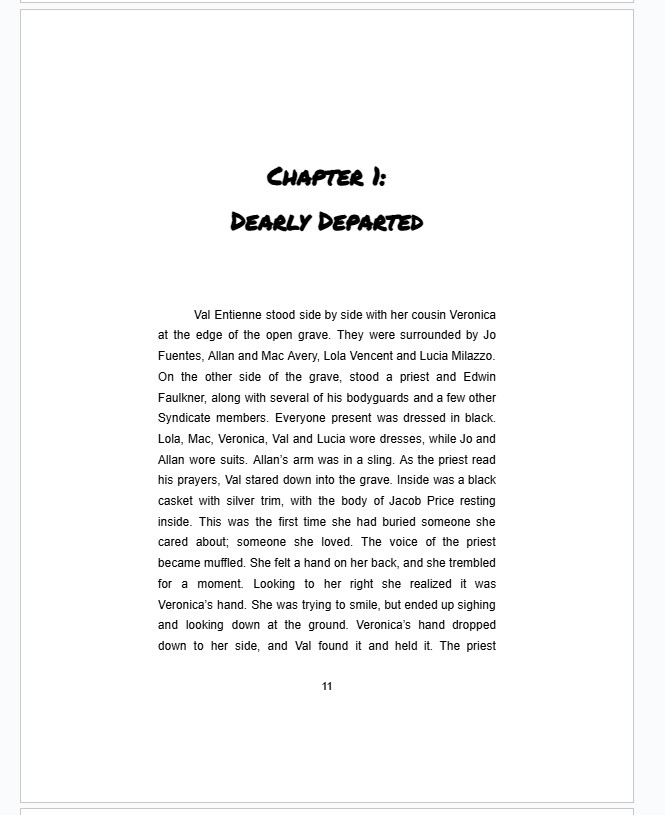
When publishing a paperback or hardcover book with KDP (this will work for ebooks, too, by the way), double check the settings for your margins. All of my books are 6×9. I set my top and bottom margins at 1.9 inches, and my left and right margins at 1.9 inches as well. This provides plenty of room for the gutter, or the inner margin where the pages are bound together. The last thing you want is for the print to be so close to the gutter it becomes difficult to read. When it comes to page numbers, I put mine at the bottom of the page, in the center, in the footer, with a margin of 1.3 inches. This will ensure that page number will print and be seen in a printed version of the book. I use a font size of 11pt for page numbers.
Below is a page from Valentine R Book Three, with 1.9 margins, and text that is in Arial, 12pt.
The text of your book is also something to consider when formatting. I recommend an easy to read font, like Times New Roman, Garamond, Baskerville, or Arial. The font size is important too: 11pt to 12pt. If it’s a large print book, consider 16pt or 18pt. Some books may use 14pt, and this may not be large enough.
Here’s another interesting piece of advice: larger chapter headings and tight margins such as the ones I listed above, make for longer books. If you’re looking to increase your page count, you can do so by enhancing your chapter titles and headings. The latest Our Lady of Righteous Rage books use chapter headings with numbers and a treble clef, which takes up extra space, but also adds pages to the book.

I hope this helps. Keep writing, everyone, and stay warm.

