
Oh, let’s talk about pen names! Let’s start with what a pen name is. By definition, it’s a false name an author uses to publish their written work instead of using their legal name. You can also call it a pseudonym or if you want to get fancy and use the Latin term, a nom de plume. Some writers use different names when switching genres so their audiences won’t be confused. Some use pen names simply because they may not care for their legal name (if my name was Elmyra P. Buttlick I would definitely use a pen name). And, there are writers who want to remain anonymous, so publishing under a pen name helps.
Pen names are not a new phenomenon. Mark Twain was actually Samuel Clemens. Mary Ann Evans used the name George Eliot , a male name, so readers would take her work seriously. And today, Nora Roberts uses the name JD Robb. When I wrote I’m Sorry For the Things I Said While I Was High: Stories & Advice, I decided to use one of my character’s names as my pen name. This was a first for me, but I have a good feeling it won’t be my last.
So here are some things to know about using a pen name with Amazon’s Author Central.
One Account
Author Central is a free site which allows published authors to manage their books and their public profile. You can only have one account on Author Central. You can claim your books and if any books are attributed to you but don’t belong to you, you can correct this. You can also see book sales and customer reviews.
3 Pen Names
Author Central will allow you to use up to three pen names. I’ve read posts online that state Amazon’s KDP will allow you to use unlimited pen names, but I don’t know if that’s true and honestly, I don’t believe it. I mean, why would you want to keep up with multiple pen names unless you were trying to do something fraudulent? And again, you can only have one account. When you set up a book on KDP, instead of entering your given name or legal name in the author field, enter your pen name instead.
Claiming Books Under Your Pen Name
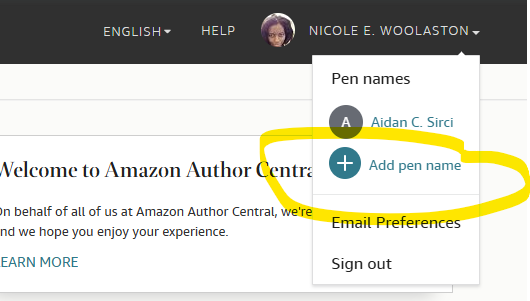
Well, this part was pretty easy. After you publish your book under your pen name, sign into your Author Central account. I waited until my book was approved by KDP to do this. On the top right of the screen you will see your name, with an arrow next to it. Click on that arrow to open a drop-down menu. There you will see “Add pen name”. Click on it and simply follow the instructions. Search for the title of your book under your pen name and claim it. You’ll receive notice that Author Central needs time to approve of this, so don’t expect it to take effect right away. Below is a screen shot from my Author Central page. Once your pen name is approved you can add an “author photo” and a bio. These will also have to wait for approval.
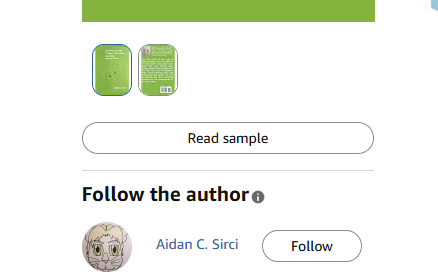
My author photo for I’m Sorry For the Things I Said While I Was High: Stories & Advice was approved yesterday (within twenty-four hours) and now the changes can be seen on Amazon when someone clicks on the book. I’m still waiting for the bio to appear.
I hope this helps someone. Have a great weekend, everyone, and keep writing.

